

Smartphone habits are reshaping how players connect with online entertainment platforms every day. Downloading the official JILI58 App shortens access steps, prevents connection interruptions, and maximizes page-loading speed directly on your mobile device. Through this guide, you will learn the exact installation steps for Android and iOS, standout app advantages, and practical security tips for reliable everyday performance.
Why Should You Download the JILI58 App on Your Phone?
Playing through the dedicated mobile app offers far greater convenience and control than repeatedly opening a traditional web browser. Once you install the official JILI58 App, you will immediately notice smoother navigation and faster touch response:
- Consistent Processing Speed: Eliminates repetitive page reloads or screen freezes when switching between game lobbies and account menus.
- Lower Mobile Data Usage: Optimizes graphic assets and local caching, making it ideal even when playing on 4G/5G mobile data.
- Instant Push Notifications: Stay updated on new promotions, maintenance schedules, and important account alerts right on your lock screen.
- One-Tap Access: Launch directly from your home screen without searching for mirror links or re-entering web addresses every session.

Detailed Guide to Downloading the JILI58 App by Operating System
To ensure installation runs smoothly, check that your phone has sufficient free storage space and a steady internet connection before starting. Following each step carefully prevents setup errors.
Installation on Android Devices
Android users can download the official installer package and complete setup in just a few minutes. Always verify that you are downloading directly from JILI58‘s official website to avoid modified third-party files:
- Open your mobile browser and visit the official JILI58 homepage: https://jili58com.ph/.
- Locate the Android app download section and tap Download App.
- If your device displays a security prompt regarding installation sources, open Settings – Security (or Apps) and allow app installations from your browser.
- Open the downloaded file in your Downloads folder, tap Install, and wait for setup to complete.
Setup on iOS Devices (iPhone & iPad)
iOS enforces strict application verification controls to safeguard user privacy and system stability. Follow the on-screen instructions carefully so the app launches normally:
- Visit the official JILI58 homepage using the Safari browser on your iPhone or iPad.
- Select the iOS app icon and follow the on-page download prompt.
- Once the app icon appears on your home screen, open Settings – General – VPN & Device Management.
- Select the corresponding developer profile and tap Trust to activate the app safely.
-
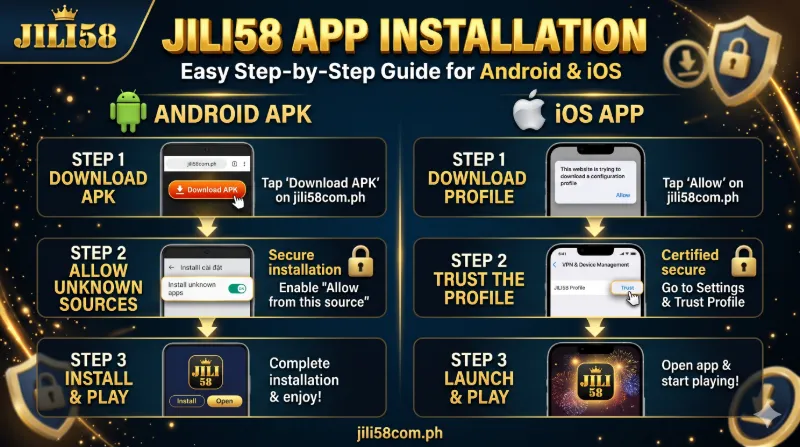
Step-by-step guide to downloading the JILI58 App on Android and iOS
Important Tips for Using the App Safely
A well-built mobile app works best when paired with careful user habits. At JILI58, where many players frequently switch between public Wi-Fi and mobile data networks, practicing smart data protection is essential:
- Never Share Login Credentials: Never send your password or OTP verification codes to anyone under any circumstances.
- Verify Links Before Downloading: Avoid tapping unfamiliar links from unsolicited text messages or pop-up ads.
- Clear Temporary Cache Periodically: Clear unnecessary app cache data if your phone runs low on storage or slows down over time.
- Contact Support If Issues Arise: If installation gets interrupted or displays an error, reach out immediately to JILI58 24/7 Customer Support for guidance.
In summary, downloading the JILI58 App is a practical step toward faster access, greater convenience, and rock-solid mobile stability. By following the proper installation steps for Android or iOS alongside basic security practices, you can enjoy a seamless, responsive experience every day.
